⚠ Four-fifths of a song you'd keep
Love the song. Hate the ending.
The track lands right up until the last twenty seconds, where it just stops. Regenerating throws away the four sections that worked.
You already have the song. Studio gives you everything that happens next — extend it, remix it, replace the section that isn't working, split the stems, retune the tempo and pitch. On the take you already liked, instead of rolling the dice on a new one.
$197 one-time · no monthly fees · 14-day money-back guarantee
No thanks — continue without StudioNothing you already bought changes.
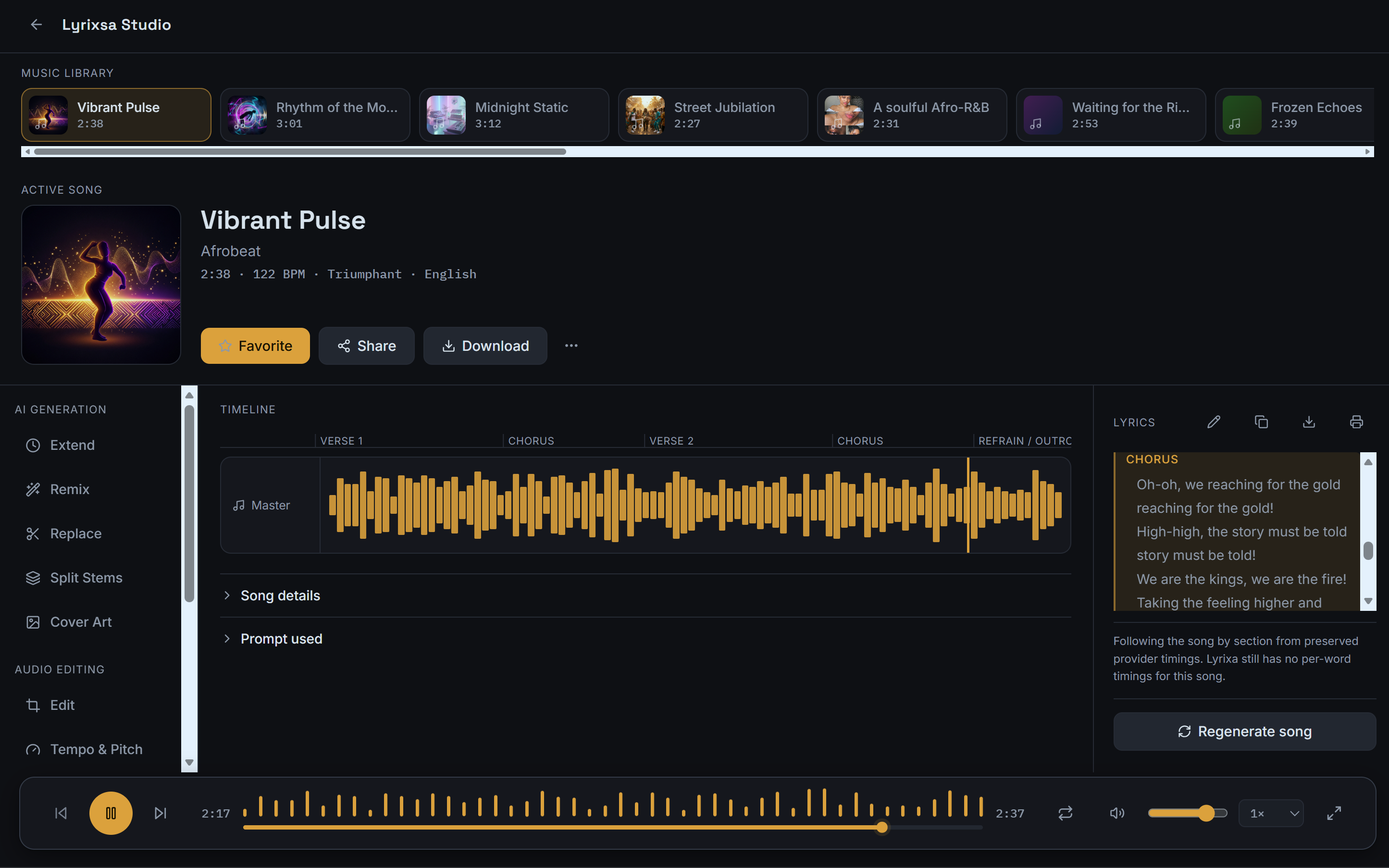
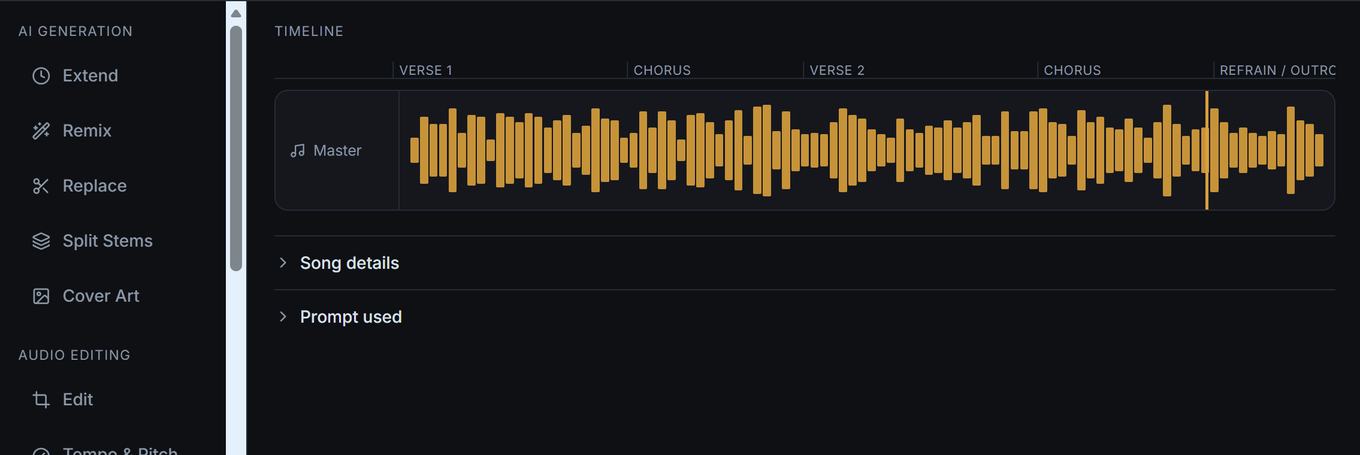
Lyrixsa Studio · the tools, the timeline and the lyric sheet in one workspace
Four things that happen to everyone who makes music with AI. None of them means the song was a failure.
⚠ Four-fifths of a song you'd keep
The track lands right up until the last twenty seconds, where it just stops. Regenerating throws away the four sections that worked.
⚠ One weak section out of five
The hook is the reason you kept this one. The second verse is the reason you haven't released it.
⚠ Ends before it's finished
It's a strong sketch that runs out before it becomes a track. You don't need a different song — you need more of this one.
⚠ No way in to the individual parts
You want the vocal on its own, or the instrumental underneath it. Right now the song is one file, all or nothing.
A Generate button can only answer one question:
“make me a different one.”
Studio opens your finished song on a timeline marked up by verse and chorus — read from the song's own lyric sheet — with every tool one click away.
AI Generation
Audio Editing
Sections, not secondsStudio reads the song's own lyric sheet and marks the timeline by verse, chorus and bridge — so you point at the part you mean.
Lyrics beside the waveformThe sheet sits next to the timeline, section by section. Edit, copy, download or print it.
Every pass is keptVersion history holds what you tried. Going back doesn't cost you the version you started from.
Each one starts from the song you already have. None of them starts over.
Great song. Not long enough.
Keep going from where the track ends instead of asking for a new one. The sketch that stopped at two minutes becomes a song that runs its full length.
← new material, same song
Keep the song. Change the part.
Point at the verse that isn't landing, describe what you'd rather hear there, and leave the rest of the track exactly as it is. The chorus you loved doesn't move.
Same idea. Different direction.
Take the song somewhere else without losing where it started. Build the slower version, the harder version, the stripped-back version — and keep them all.
Stop treating the song like one file.
Pull the finished track apart into its separate layers. Use the vocal on its own, drop the vocal for an instrumental bed, or rebalance what sits where.
You already own the first two steps. Studio is the four after them — the part where a generated draft turns into the version you actually wanted.
You don't have to settle for the first version. Lyrixsa makes the song. Studio decides what happens to it — which is the difference between a folder of near-misses and a track you'd put your name on.
One payment, added to the Lyrixsa account you already have.
The editing and production layer of Lyrixsa
The shift is simple. Right now, when something isn't quite right, your only move is to generate again and hope the next one keeps what you liked about this one. Studio gives you the other option — change the part, keep the song.
Yes — add Lyrixsa Studio

$197 one-time · added to your existing account · no subscription
No thanks — continue without StudioNothing you already bought changes.

Lyrixsa creates the song, and it will keep doing that with or without Studio. Studio is the layer that comes after: it's what you use when a generated track is close but not finished. If you're happy releasing first takes, you don't need it. If you've ever wanted to change one part of a song without losing the rest, that's what this adds.
Yes. Studio opens from your existing library — the songs already in your account are the ones you'll edit. Your commercial license and certificate carry over exactly as they are.
No. $197 one-time, added to the Lyrixsa account you already own. No monthly fees.
Nothing changes. Everything you bought stays exactly as it is and keeps working. Studio is an addition to it, not a missing piece of it.
Extend it. Remix it. Replace the part that isn't working. Pull the stems apart. Then export the version you actually meant to make.
Yes — add Lyrixsa Studio
$197 one-time · 14-day money-back guarantee
No thanks — continue without StudioNothing you already bought changes.
These documents are the operative terms for Lyrixsa AI. Summaries elsewhere on this page are for readability and do not replace them.
These Terms of Service (“Terms”) govern your access to and use of Lyrixsa AI, including the Lyrixsa AI website, application, software, tools, features, content, services, and related products (collectively, the “Services”).
Lyrixsa AI is a product of Geecore Limited (“Geecore,” “we,” “us,” or “our”).
By accessing or using Lyrixsa AI, you agree to be legally bound by these Terms. If you do not agree with these Terms, you must not access or use the Services.
By accessing or using Lyrixsa AI, you agree to comply with these Terms, all applicable laws and regulations, and any additional rules, policies, or guidelines that we may publish from time to time.
You are responsible for ensuring that your use of Lyrixsa AI complies with the laws applicable to you.
Lyrixsa AI provides artificial-intelligence-powered tools that may allow users to create, transform, analyze, edit, organize, license, prepare, and publish music and related content.
Certain features may depend upon third-party services, technologies, APIs, music platforms, distribution services, payment processors, or other external providers.
We may modify, suspend, discontinue, or replace any portion of the Services at any time.
Permission is granted to access and use the Lyrixsa AI website and Services for their intended purposes, subject to these Terms.
This is a license to use the Services, not a transfer of ownership.
Except where expressly permitted by these Terms or your applicable Lyrixsa license, you may not:
Your Lyrixsa AI account is personal to you unless your applicable subscription or business agreement expressly permits multiple users.
You are responsible for maintaining the confidentiality of your login credentials and for activities conducted through your account.
You must notify us promptly if you believe your account has been accessed without authorization.
Where this product or its marketing refers to “lifetime” or “for life” access, this refers to the supported operational lifetime of the Lyrixsa AI product.
Geecore Limited commits to providing active access for a minimum of 5 years from the purchaser’s date of purchase.
Continued access beyond this minimum period is intended but not contractually guaranteed.
Lyrixsa AI uses artificial-intelligence technologies to generate and process music and related content.
AI-generated results may vary from one generation to another and may not always produce the result you expect.
You acknowledge that:
Lyrixsa AI may apply technical safeguards, content filters, watermarking, moderation, or other mechanisms to AI-generated content.
You may provide prompts, lyrics, images, audio, song references, artwork, text, and other materials to Lyrixsa AI (“User Content”).
You retain ownership of your User Content, subject to the rights and licenses necessary for us to operate the Services.
You represent and warrant that you have all necessary rights, permissions, licenses, and authorizations to submit User Content to Lyrixsa AI and to use it for the purpose for which you submit it.
You must not upload, submit, or process content that you do not have the legal right to use.
This includes, without limitation:
Lyrixsa AI may provide tools that allow you to submit supported music references or links for analysis, inspiration, or other permitted functionality.
Providing a link to a song does not transfer ownership of that song to you or to Lyrixsa AI.
You are responsible for ensuring that your use of any referenced music complies with applicable copyright, licensing, platform, and other legal requirements.
You may not use Lyrixsa AI to reproduce, distribute, exploit, or otherwise infringe third-party copyrighted music.
Lyrixsa AI may restrict or block requests involving copyrighted lyrics, unauthorized reproduction, artist impersonation, or other prohibited uses.
Certain Lyrixsa AI plans may include commercial-use rights, licensing documentation, certificates, or other licensing-related features.
Where applicable, the rights granted to you are determined by:
A Lyrixsa AI subscription or purchase does not automatically grant ownership of third-party music, samples, recordings, lyrics, trademarks, or other intellectual property.
Where Lyrixsa AI provides a commercial-use license for eligible generated music, that license applies only to music and usage that satisfy the applicable license terms.
You remain responsible for ensuring that your intended use complies with the applicable license.
No license granted by Lyrixsa AI authorizes you to claim ownership of third-party intellectual property.
Lyrixsa AI may provide tools or services designed to help users prepare music for publishing or distribution to third-party music platforms.
These platforms may include services such as Spotify, Apple Music, YouTube Music, Amazon Music, Tidal, Deezer, TikTok, Instagram/Facebook, Boomplay, Tencent/QQ Music, and other platforms that may become available.
Availability of any particular platform is not guaranteed.
Third-party platforms maintain their own:
Lyrixsa AI does not guarantee that any third-party platform will accept, publish, distribute, monetize, or maintain your music.
A distribution submission may be rejected, delayed, removed, demonetized, claimed, or otherwise restricted by a third-party platform.
You remain responsible for providing accurate metadata and ensuring that you have the rights necessary to distribute the music you submit.
Where Lyrixsa AI provides features relating to music publishing, distribution, royalties, or monetization, any earnings depend on factors outside our control.
Lyrixsa AI does not guarantee:
Any earnings examples, calculations, estimates, demonstrations, or references displayed by Lyrixsa AI are for illustrative purposes unless expressly stated otherwise.
You agree not to use Lyrixsa AI to:
We reserve the right to suspend or terminate accounts that violate these requirements.
Certain Lyrixsa AI features may operate using credits, generation limits, storage limits, subscription limits, or other usage restrictions.
Credits and usage allowances may vary depending on your plan.
Unless otherwise stated at the time of purchase:
We reserve the right to impose reasonable usage limits to protect the Services from abuse or excessive automated usage.
Lyrixsa AI is designed to provide AI-powered music creation, editing, licensing, publishing, and distribution tools for genuine creative use. Certain plans may advertise or provide “Unlimited” music creation or “Unlimited” publishing.
“Unlimited” means that eligible users may use the applicable feature without a fixed credit-based quantity limit, subject to this Fair Use Policy, the technical limits of the Services, the applicable plan terms, and the rules of our third-party service and distribution partners.
Unlimited access does not mean unlimited use for automated abuse, system exploitation, spam, resale, or activity that is unreasonable in relation to the intended use of the Services.
Where a plan includes unlimited music creation, ordinary human use of the music-generation features is permitted without a predetermined number of songs or generations.
However, Lyrixsa AI may apply reasonable safeguards, rate limits, concurrency limits, temporary restrictions, or other usage controls where necessary to protect the Services, third-party AI providers, infrastructure, or other users.
Examples of use that may fall outside fair use include, without limitation:
Unless a specific plan or offer expressly states otherwise, Lyrixsa AI does not intend to impose an arbitrary fixed number of music generations on an eligible Unlimited Music Creation plan.
The fact that a user creates a large number of songs does not, by itself, constitute misuse. The relevant consideration is whether the activity is consistent with the intended human use of the Services and whether it places unreasonable or abusive demands on the platform or its providers.
Music creation and music publishing/distribution are separate operational functions.
An Unlimited Music Creation & Publishing plan may provide unlimited publishing subject to this Fair Use Policy. This does not require Lyrixsa AI or its distribution partners to accept an unlimited number of releases regardless of volume, quality, metadata, rights status, or platform requirements.
For standard publishing workflows, Lyrixsa AI may specify a normal publishing allowance or require publisher credits for additional publishing where stated in the applicable offer or plan.
Where an Unlimited plan removes a stated publishing allowance, publishing remains subject to reasonable fair-use controls and the requirements of Lyrixsa AI’s distribution partners and third-party music platforms.
For example, the Unlimited Music Creation & Publishing offer may permit unlimited publishing for ordinary use, while Lyrixsa AI reserves the right to review, limit, delay, pause, or otherwise control unusually high-volume or abusive release activity.
The following may be considered outside fair use, depending on the circumstances:
Music submitted for publishing or distribution may be reviewed against the requirements of the applicable distributor, rights-management provider, streaming service, social platform, or other third-party service.
These third parties may impose their own limits, review procedures, metadata requirements, content rules, artist requirements, copyright requirements, fraud controls, release limits, or other restrictions.
Lyrixsa AI cannot guarantee that a particular number of releases will be accepted, delivered, published, monetized, or maintained by any third-party platform.
A commercial license from Lyrixsa AI does not override the rules of a distributor, streaming platform, social network, rights-management service, or other third party.
Fair-use restrictions concern how the Lyrixsa AI Services may be used. They do not, by themselves, remove or reduce a commercial license that was validly granted for eligible Generated Music, except where the license or applicable terms expressly provide otherwise.
The Commercial Music License Agreement governs the commercial rights granted for eligible music.
Users must continue to comply with the Commercial Music License Agreement, these Terms, applicable laws, and the rules of relevant third-party platforms.
If Lyrixsa AI reasonably determines that activity may exceed fair use or create a material risk to the Services, its users, or third-party partners, we may take reasonable measures, including:
Where reasonably practicable, Lyrixsa AI may provide notice and an opportunity to address the issue before taking longer-term action, except where immediate action is necessary to protect the Services, users, third parties, security, legal rights, or platform integrity.
Nothing in an “Unlimited Publishing” or similar offer guarantees a particular number of releases, a particular distribution volume, or acceptance by any third-party distributor or music platform.
Operational limits may change where required by third-party providers, distribution partners, technical capacity, fraud-prevention requirements, platform rules, or other legitimate operational considerations.
Lyrixsa AI may provide features that allow users to submit song references, supported music links, lyrics, audio, images, or other material for analysis, inspiration, transformation, or other permitted functionality.
Providing a reference or link does not transfer ownership of the referenced work to the user or to Lyrixsa AI.
Users must have the rights, permissions, or other lawful basis necessary to submit material to the Services and to use the resulting output for their intended purpose.
Copyright exceptions such as fair use may apply in some circumstances, but fair use is a case-by-case legal determination. Lyrixsa AI does not determine that a particular use qualifies as fair use and does not provide legal advice.
Users should not assume that a short portion, limited duration, percentage, number of words, musical notes, or other fixed amount of copyrighted material is automatically lawful.
Users must not use Lyrixsa AI to falsely represent that a real artist created, performed, endorsed, authorized, or sponsored content when that is not true.
Users must have appropriate rights and consent when using another person's voice, name, likeness, identity, or other protected personal attributes.
Using general genre or musical characteristics as inspiration is different from falsely impersonating a particular artist.
Before distributing music through Spotify, Apple Music, YouTube Music, TikTok, Instagram/Facebook, Amazon Music, Tidal, Deezer, Boomplay, Tencent/QQ Music, or another platform, users must comply with the current rules of the relevant distributor and platform.
The existence of a Lyrixsa commercial license does not guarantee acceptance into Content ID, rights-management, fingerprinting, or other automated copyright systems.
Users must not submit false copyright claims or attempt to claim exclusive ownership over material they do not have the legal right to control.
Users are responsible for reviewing generated music and other outputs before commercial release, publishing, distribution, licensing, monetization, or other use.
Users remain responsible for ensuring that their intended use complies with applicable law, the applicable Lyrixsa license, and third-party platform requirements.
If you believe a user is using Lyrixsa AI to infringe copyright, violate another person's rights, impersonate an artist, manipulate distribution or royalty systems, or otherwise misuse the Services, you may contact us through:
https://app.lyrixsa.com/support
or
Where available, reports should include sufficient information to identify the relevant account, track, release, URL, or alleged violation.
Lyrixsa AI cannot determine whether a particular use of copyrighted material qualifies as fair use.
Only a court or other legally authorized authority may make a binding legal determination in a particular dispute.
This Fair Use Policy describes platform rules and operational safeguards and is not legal advice.
Fair-use rules and copyright exceptions vary by jurisdiction. The U.S. concept of “fair use” may differ from copyright exceptions or “fair dealing” rules applicable in other countries.
If you use Lyrixsa AI outside the United States, you are responsible for complying with the laws applicable to your use.
Lyrixsa AI may update, refine, or modify fair-use controls as the Services, technology, distribution relationships, third-party requirements, and operational needs change.
Any such controls will be applied in a manner consistent with the applicable plan terms and applicable law.
Lyrixsa AI may integrate with or rely upon third-party services, including music platforms, payment processors, artificial-intelligence providers, cloud infrastructure providers, distribution services, analytics providers, and other external services.
Your use of third-party services is subject to their respective terms and privacy policies.
We are not responsible for changes, interruptions, outages, restrictions, pricing changes, or policies imposed by third-party services.
You agree to provide accurate billing and payment information when purchasing Lyrixsa AI.
Prices, plans, features, bonuses, credits, and payment terms may change from time to time.
Any purchase is subject to the pricing and terms displayed at the time of purchase.
Certain purchases may be one-time payments, subscriptions, upgrades, add-ons, credits, certifications, or other products.
Where a subscription is offered, it will continue according to the subscription terms presented at checkout unless cancelled in accordance with those terms.
Unless otherwise stated for a specific offer, eligible purchases may be covered by a 14-day refund policy.
To request a refund, you must contact Lyrixsa AI support within the applicable refund period through:
https://app.lyrixsa.com/support
or by email at:
Refund eligibility may be subject to the specific terms displayed at the time of purchase.
Once a refund has been issued, your access to the refunded product, license, credits, or associated benefits may be revoked.
The Services and all materials provided by Lyrixsa AI are provided on an “AS IS” and “AS AVAILABLE” basis.
Geecore Limited makes no warranties, express or implied, regarding the Services, including warranties of:
We do not guarantee that:
AI systems can produce unexpected or inaccurate results. You should review generated content before using, licensing, publishing, distributing, or commercially exploiting it.
Lyrixsa AI, its software, website, branding, logos, designs, interfaces, documentation, trademarks, and proprietary technology are owned by or licensed to Geecore Limited and are protected by applicable intellectual-property laws.
Nothing in these Terms transfers ownership of Lyrixsa AI or its underlying technology to you.
Lyrixsa AI and related logos, names, designs, and branding are trademarks or proprietary assets of Geecore Limited or their respective owners.
You may not use our trademarks or branding without prior written permission.
To the maximum extent permitted by applicable law, Geecore Limited and its officers, directors, employees, contractors, affiliates, licensors, suppliers, and service providers shall not be liable for indirect, incidental, special, consequential, exemplary, or punitive damages, including loss of:
This limitation applies whether the claim arises from contract, negligence, tort, statute, or any other legal theory.
To the extent permitted by law, our total aggregate liability arising from or relating to the Services shall not exceed the amount you paid to Geecore Limited for the applicable Services during the twelve months preceding the event giving rise to the claim.
Some jurisdictions do not permit certain limitations of liability, so some limitations may not apply to you.
You agree to defend, indemnify, and hold harmless Geecore Limited and its officers, directors, employees, contractors, affiliates, licensors, and service providers from claims, liabilities, damages, losses, costs, and expenses arising from:
The materials appearing on the Lyrixsa AI website or within the Services may contain technical, typographical, or other errors.
Geecore Limited does not warrant that all information is accurate, complete, or current.
We may modify the Services, features, documentation, pricing, or other materials at any time.
We are not obligated to update previously published information unless required by applicable law.
Lyrixsa AI may contain links to third-party websites and services.
Geecore Limited has not reviewed all third-party websites and is not responsible for their content, availability, security, privacy practices, or terms.
The inclusion of a link does not constitute an endorsement.
Your use of third-party websites is at your own risk.
Geecore Limited may revise these Terms from time to time.
When we make material changes, we may update the “Last Updated” date and, where appropriate, provide additional notice.
Your continued use of Lyrixsa AI after revised Terms become effective constitutes acceptance of the revised Terms.
We may suspend or terminate your access to Lyrixsa AI if:
You may stop using Lyrixsa AI at any time.
Upon termination, provisions that by their nature should survive termination will remain in effect, including provisions relating to intellectual property, disclaimers, limitations of liability, indemnification, and dispute resolution.
These Terms shall be governed by and construed in accordance with the laws applicable to Geecore Limited's applicable jurisdiction, without regard to conflict-of-law principles, except where applicable law requires otherwise.
Any dispute shall be resolved in the courts having appropriate jurisdiction, subject to any mandatory rights you may have under applicable law.
Where you connect Lyrixsa AI to a social network, music platform, distribution service, storage provider, or other third-party service, you authorize the applicable service to provide information and access according to the permissions you approve.
Your relationship with that third-party service remains subject to its own terms and privacy policy.
You may revoke third-party access where the applicable service provides a mechanism for doing so.
Your privacy is important to us.
Our Privacy Policy explains how Geecore Limited collects, uses, stores, protects, and processes personal information in connection with Lyrixsa AI.
By using Lyrixsa AI, you acknowledge that your information may be processed as described in the applicable Privacy Policy.
We aim to:
Where Lyrixsa AI integrates with third-party AI or API services, those services may have their own data-processing terms and policies.
For Lyrixsa AI customer support:
Lyrixsa AI Support
https://app.lyrixsa.com/support
For general administrative matters relating to Geecore Limited:
Geecore Limited
© 2026 Geecore Limited. All Rights Reserved.
Lyrixsa AI is a product of Geecore Limited.
All rights reserved except where expressly stated otherwise.
Licensor:
Geecore Limited, operating Lyrixsa AI ("Lyrixsa", "we", "us", or "our")
Licensee:
The individual or legal entity that purchases an eligible Lyrixsa AI commercial-use product ("Licensee", "you", or "your").
This Commercial Music License Agreement ("License") governs the commercial-use rights granted for eligible music generated through Lyrixsa AI. It should be read together with the Lyrixsa AI Terms of Service and Privacy Policy. If there is a conflict, the applicable Terms of Service and the specific product/offer terms control to the extent stated there.
1.1"Generated Music" means an audio track, song, instrumental, composition, lyrics, stems, or other music output generated through eligible Lyrixsa AI features.
1.2"Licensed Music" means Generated Music that qualifies for commercial use under the Licensee's purchased Lyrixsa AI plan and that was generated in accordance with the Lyrixsa AI Terms of Service and applicable product rules.
1.3"Commercial Use" means lawful use of Licensed Music for business, professional, promotional, monetized, or revenue-generating purposes, including use in monetized videos, advertisements, social media content, podcasts, courses, games, websites, client projects, branded content, public performances, and music distribution, subject to this License and applicable third-party platform rules.
1.4"License Certificate" means any downloadable document issued by Lyrixsa AI identifying an eligible Licensed Music track and providing supporting evidence of the applicable commercial-use license.
2.1Commercial-use rights are available only for Generated Music that is expressly covered by an eligible Lyrixsa AI commercial-use product, purchase, subscription, or offer.
2.3Unless the applicable product terms expressly state otherwise, music generated under free access, non-commercial access, promotional access, or a plan that does not include commercial rights is not covered by this License.
2.4Commercial rights do not automatically apply to third-party music, samples, recordings, lyrics, images, voices, names, likenesses, or other material supplied by the Licensee.
3.1Subject to this License, Lyrixsa grants the Licensee a non-exclusive, worldwide, royalty-free commercial license to use eligible Licensed Music for lawful commercial and non-commercial purposes.
3.3The License is intended to permit commercial exploitation of eligible Licensed Music without an additional royalty payable to Lyrixsa solely because the music is commercially used, subject to any separate fees expressly stated for Lyrixsa services, publishing, distribution, or other products.
4.1For eligible music covered by a perpetual commercial-use purchase, the commercial-use rights granted under this License continue for that eligible music after cancellation, expiration, or termination of the user's account, except where the License is validly revoked because of a material breach or where applicable law requires otherwise.
4.3The License does not grant continued access to the Lyrixsa AI software, account, models, dashboard, credits, or other platform services after a subscription or purchase ends.
5.1Lyrixsa retains all rights in and to the Lyrixsa AI platform, software, models, technology, trademarks, branding, documentation, and service infrastructure.
5.2This License grants commercial-use rights in eligible Licensed Music. It does not transfer ownership of the Lyrixsa AI platform or its underlying technology.
5.3Copyright protection for AI-generated material can vary by jurisdiction and may depend on the degree of human authorship and other legally relevant facts. Nothing in this License guarantees that a particular Generated Music track qualifies for copyright protection in every jurisdiction.
5.4Where the Licensee contributes original lyrics, recordings, compositions, performances, edits, arrangements, or other human-authored material, the Licensee remains responsible for determining and protecting any rights that may arise from those contributions.
6.2The License does not give the Licensee permission to use another person's copyrighted recording, composition, lyrics, trademark, voice, name, likeness, or other protected material.
6.3If the Licensee uses a supported song reference, Spotify link, Apple Music link, upload, sample, or other third-party reference as an input, the Licensee is responsible for complying with all applicable rights and platform rules relating to that input.
7.2Lyrixsa does not guarantee that every Generated Music track is unique in every musical characteristic or that no third party will independently create a similar work.
7.3The Licensee must not deliberately use Licensed Music to impersonate a real artist, falsely imply endorsement by a real artist, or violate a person's publicity, privacy, trademark, or other rights.
8.1Eligible Licensed Music may be submitted to music distributors and digital music platforms, subject to their current rules, policies, technical requirements, and acceptance procedures.
8.2Lyrixsa does not guarantee that Spotify, Apple Music, YouTube Music, Amazon Music, Tidal, Deezer, TikTok, Instagram/Facebook, Boomplay, Tencent/QQ Music, any distributor, performing rights organization, collecting society, or other third party will accept, retain, monetize, or promote a particular track.
9.1Subject to the applicable distributor, platform, publishing, collection, and service terms, the Licensee may monetize eligible Licensed Music and retain royalties or other revenue payable to the Licensee.
10.1Commercial use under this License does not by itself guarantee that a third-party content-identification or rights-management service will accept a track.
10.2The Licensee must comply with the rules of the selected distributor and rights-management service before submitting Licensed Music to Content ID, Rights Manager, fingerprinting databases, or similar systems.
10.3The Licensee must not use any rights-management system to make a false claim of exclusive ownership over material when the Licensee does not have the necessary rights to make that claim.
The Licensee may not:
12.1Where Lyrixsa AI provides a commercial license certificate for an eligible track, the certificate is supporting documentation of the commercial-use rights associated with that track.
13.1This License does not guarantee that any distributor, streaming service, social network, marketplace, advertising platform, rights society, collecting society, or other third party will accept a Licensed Music track.
13.2Third-party platforms may establish their own requirements concerning AI-generated music, copyright, metadata, Content ID, monetization, disclosure, or distribution.
To the maximum extent permitted by applicable law, Lyrixsa and Geecore Limited will not be liable for indirect, incidental, special, consequential, exemplary, or punitive damages, or for loss of profits, revenue, streams, sales, data, goodwill, or business opportunities arising from use of Licensed Music or from actions taken by third-party platforms, distributors, rights organizations, or other services.
15.1Lyrixsa may suspend or revoke commercial-use rights for an affected track if the Licensee materially breaches this License, the Terms of Service, or applicable law.
15.3Where a license is revoked, the Licensee must stop new commercial exploitation of the affected track and take reasonable steps to comply with the revocation notice, subject to applicable law.
This License forms part of the Lyrixsa AI legal framework and should be read together with the Lyrixsa AI Terms of Service and Privacy Policy.
Lyrixsa may update this License from time to time. The version applicable to a particular Licensed Music track will be determined in accordance with the applicable Terms of Service and product terms.
Lyrixsa AI
A product of Geecore Limited
Website:
Support:
https://app.lyrixsa.com/support
Email:
© 2026 Geecore Limited. All Rights Reserved.
This document is a commercial licensing template for Lyrixsa AI and is not legal advice. Before publishing or relying on this License as a binding legal document, Geecore Limited should have qualified legal counsel review it for the jurisdictions in which Lyrixsa AI operates and for the exact rights provided by each underlying AI/music provider.
Lyrixsa AI is a product of Geecore Limited (“Geecore,” “we,” “us,” or “our”).
This Privacy Policy explains how we collect, use, process, store, protect, and disclose information when you access or use Lyrixsa AI, including our website, application, software, tools, features, and related services (collectively, the “Services”).
By using Lyrixsa AI, you acknowledge that your information may be collected and processed as described in this Privacy Policy.
Lyrixsa AI may allow you to create or access an account using supported authentication methods or to connect certain third-party accounts. If you choose to connect a third-party account, we may receive information that the third party makes available according to the permissions you authorize.
The information received may include account identifiers, name, email address, profile information, authentication information, or other information necessary to provide the connected feature.
You can generally disconnect a connected service through the available Lyrixsa AI controls or through the third-party service. Disconnecting a service may prevent certain features from continuing to function.
Lyrixsa AI may provide integrations or links involving social networks, music streaming services, music distribution platforms, publishing services, or other external platforms.
When you choose to use an integration, information may be transmitted to or received from the applicable third party as necessary to perform the requested function.
For example, a distribution request may require us or our distribution partners to provide information such as artist details, release metadata, audio, artwork, licensing information, or other materials needed to submit a release.
Third-party platforms operate independently and may retain or process information under their own terms and privacy policies. Removing information from Lyrixsa AI does not automatically remove information that has already been submitted to or published by an external platform.
Lyrixsa AI may sell digital products, subscriptions, credits, licenses, or related services online. Personal and transaction information needed to complete a purchase may be processed by the applicable payment processor.
Depending on the payment method, information may include payment status, transaction identifiers, purchase details, billing country, and limited payment-related information. The payment processor may separately process payment information under its own privacy policy and security practices.
Lyrixsa AI may use cloud hosting, storage, backup, and infrastructure providers to store account information, projects, generated music, uploaded content, metadata, and other information required to operate the Services.
Information may therefore exist in active systems, backups, logs, or disaster-recovery systems for a limited period. Deleting information from an active system does not necessarily mean that every backup copy is immediately destroyed.
Backups are generally allowed to expire or be overwritten according to the applicable backup lifecycle, subject to legal, security, and operational requirements.
When you contact Lyrixsa AI through customer support, contact forms, email, chat, feedback tools, or similar communication channels, we may collect the information you provide and technical information associated with the communication.
This may include your name, email address, account information, purchase information, messages, attachments, screenshots, and information needed to investigate your request.
We use this information to respond to you, provide support, investigate technical problems, process eligible billing or refund requests, prevent abuse, and improve our Services.
Lyrixsa AI may use analytics, cookies, pixels, local storage, session technologies, or similar technologies to understand how visitors and users interact with our website and Services.
These technologies may help us measure traffic, feature usage, conversion activity, performance, errors, security events, and general service usage.
Where advertising, remarketing, or conversion-measurement technologies are used, they may process information such as cookies, device identifiers, IP address, browser information, or usage data according to the applicable provider's policies and applicable law.
You may be able to control certain cookies and similar technologies through your browser or device settings.
Where permitted by law, Lyrixsa AI may use contact information to communicate with users about Lyrixsa AI, Geecore Limited products and services, software launches, offers, related tools, educational opportunities, partner promotions, affiliate offers, and other relevant commercial opportunities.
Marketing communications may be sent in the name of Goodluck Efe, Founder of Lyrixsa AI, representing Lyrixsa AI and/or Geecore Limited. This does not change Geecore Limited's status as the company operating Lyrixsa AI.
You may unsubscribe from promotional communications at any time using the unsubscribe mechanism provided in the message. We may retain limited suppression or opt-out information when reasonably necessary to ensure that we honor your marketing preference.
Transactional, account, security, legal, billing, and other essential service communications may continue after you opt out of marketing.
We may use service providers to perform functions on our behalf, including hosting, storage, analytics, authentication, payments, communications, customer support, security, artificial-intelligence processing, music distribution, and other operational services.
These providers may have access to information only as reasonably necessary to perform their services, subject to applicable contractual, legal, and privacy requirements.
The particular providers we use may change over time as the Services evolve.
We seek to collect and retain information that is reasonably necessary for legitimate purposes connected with the Services.
Retention periods may differ depending on the category of information. Account information and user content may be retained while an account is active. Transaction, licensing, publishing, security, and other records may be retained longer where reasonably necessary for legal, accounting, fraud-prevention, dispute-resolution, contractual, or other legitimate purposes.
When information is no longer reasonably required, we may delete or anonymize it, subject to applicable requirements and our Data Retention and Data Deletion provisions.
Lyrixsa AI does not sell personal information simply because you use the Services.
We may nevertheless disclose or transfer information to service providers, business partners, payment processors, distribution partners, connected third-party platforms, professional advisers, or authorities where reasonably necessary for the purposes described in this Privacy Policy or as permitted or required by law.
Nothing in this section is intended to limit privacy rights that apply to you under the laws of your jurisdiction.
Lyrixsa AI and/or Geecore Limited may participate in affiliate marketing, joint-venture, referral, reseller, and partner programs. These may include JVZoo, JVShare, Launchpad, ClickBank, Amazon Associates, the AliExpress Affiliate Program, and other applicable affiliate or partner programs.
Affiliate and partner links may use cookies, tracking links, referral identifiers, pixels, and similar technologies to identify the source of visits, attribute sales or conversions, prevent fraud or abuse, measure campaign performance, and calculate commissions or other partner payments.
Lyrixsa AI and/or Geecore Limited may receive a commission or other compensation when a user purchases a product or service through a qualifying affiliate, referral, or partner link. Where applicable, such compensation generally does not increase the price paid by the customer.
Personal Data that may be processed in connection with affiliate and partner activities may include:
The specific affiliate, referral, or partner programs used by Lyrixsa AI may change over time.
Lyrixsa AI and/or Geecore Limited uses online advertising, conversion tracking, audience measurement, remarketing, and related advertising technologies to promote the Services, measure advertising performance, understand how visitors interact with our website, and improve our marketing campaigns.
Lyrixsa AI may use Google advertising and measurement technologies, including Google Ads and related Google advertising, remarketing, conversion-tracking, audience-measurement, and campaign technologies.
These technologies may be used to display or measure advertisements across applicable Google advertising channels and properties, measure conversions, understand campaign performance, create or use advertising audiences, and support remarketing activities where permitted.
Personal Data that may be processed may include:
Lyrixsa AI may use Meta advertising technologies, including Facebook and Instagram advertising, Meta Pixel and related conversion and audience-measurement technologies, remarketing, Custom Audiences, and other applicable Meta advertising services.
These technologies may be used to measure advertising conversions, understand campaign performance, create or use advertising audiences, perform remarketing, and improve the effectiveness of Lyrixsa AI advertising campaigns.
Personal Data that may be processed may include:
Google and Meta may process information collected through their advertising technologies according to their respective privacy policies, terms, and applicable data-processing practices.
Where required by applicable law, Lyrixsa AI will provide appropriate notices, choices, consent mechanisms, or other controls relating to advertising cookies and similar technologies.
You may also be able to manage certain advertising preferences through your browser, device settings, or controls made available by the applicable advertising provider.
Depending on how you use Lyrixsa AI, we may collect information including:
We may also collect information that you voluntarily provide when contacting us, submitting feedback, requesting support, participating in promotions, or otherwise communicating with us.
You may provide information directly to us when you:
You are responsible for ensuring that information you submit to Lyrixsa AI is accurate and that you have the right to provide that information.
Lyrixsa AI allows users to submit prompts, lyrics, images, audio, song references, and other materials to generate, analyze, edit, or otherwise process music and related content.
Depending on the feature used, information submitted to the Services may need to be processed by Lyrixsa AI and/or third-party technology providers that help us provide the requested functionality.
We may process User Content to:
You should not submit confidential, sensitive, or personal information to an AI generation or processing feature unless you understand why it is being submitted and that you have the right to do so.
We may use information we collect to:
Payments may be processed by third-party payment processors.
When you purchase Lyrixsa AI, payment information may be collected and processed by the applicable payment provider.
We may receive information such as:
We generally do not need to store your complete payment-card number in our own systems when payment processing is handled by a third-party payment processor.
Your use of third-party payment services may also be subject to the provider's own privacy policy and terms.
Lyrixsa AI may integrate with third-party services, including:
If you choose to connect a third-party service to Lyrixsa AI, information may be exchanged with that service as necessary to provide the functionality you requested.
Your use of the third-party service is also governed by that provider's own terms and privacy policy.
Third-party services may process information according to their own policies.
Where you connect Lyrixsa AI to a social network, music platform, distribution service, or other external service, we may receive or access information according to the permissions you authorize.
For example, if you authorize a third-party account to connect with Lyrixsa AI, the information made available through that integration may be processed to provide the requested feature.
You may revoke access through the applicable third-party service or through the controls provided by Lyrixsa AI where available.
Revoking access may prevent certain connected features from functioning.
When you use Lyrixsa AI, we may automatically collect technical information such as:
We use this information to operate, secure, troubleshoot, analyze, and improve the Services.
Lyrixsa AI may use cookies, local storage, pixels, session technologies, and similar technologies.
These technologies may be used to:
You may be able to control cookies through your browser settings. Disabling certain cookies may cause some features of the Services to function incorrectly.
We may use analytics and measurement technologies to understand how users interact with Lyrixsa AI.
Analytics information may help us understand:
Where applicable, analytics providers may process information according to their own privacy policies.
We may use your email address to send:
You may unsubscribe from promotional communications by using the unsubscribe mechanism included in those communications.
Transactional and essential service communications may continue even if you opt out of marketing communications.
If you contact us through:
https://app.lyrixsa.com/support
or
we may collect and retain information you provide to help us respond to your request.
Support records may include:
We use support information to respond to requests, troubleshoot problems, process refunds where applicable, and improve our Services.
We do not sell your personal information simply because you use Lyrixsa AI.
We may share information where reasonably necessary to operate the Services, including with:
Service providers may process information on our behalf and according to applicable agreements and instructions.
We may disclose information where we reasonably believe disclosure is necessary to:
If Geecore Limited is involved in a merger, acquisition, financing, reorganization, sale of assets, bankruptcy, or similar transaction, information associated with the Services may be transferred as part of that transaction, subject to applicable law.
We retain information for as long as reasonably necessary to:
Retention periods may vary depending on the type of information and the reason it was collected.
When information is no longer reasonably required, we may delete, anonymize, or otherwise dispose of it, subject to applicable legal and operational requirements.
We use reasonable administrative, technical, and organizational safeguards designed to protect information against unauthorized access, disclosure, alteration, misuse, or destruction.
However, no method of transmission, storage, or electronic security can be guaranteed to be completely secure.
Accordingly, we cannot guarantee absolute security of information.
Depending on where you use Lyrixsa AI and where our service providers operate, your information may be processed or stored in countries other than the country in which you live.
Those countries may have different data-protection laws.
By using the Services, you acknowledge that information may be processed internationally, subject to applicable legal requirements.
Lyrixsa AI is not intended for children who are below the minimum age required to independently use the Services under applicable law.
We do not knowingly seek to collect personal information from children in violation of applicable law.
If you believe a child has provided personal information to us inappropriately, please contact us at [email protected].
Depending on where you live, you may have rights concerning your personal information, which may include:
These rights vary by jurisdiction and may be subject to legal exceptions.
To make a privacy-related request, contact:
or use:
https://app.lyrixsa.com/support
We may need to verify your identity before completing certain requests.
Where available, you may request deletion of your Lyrixsa AI account and associated personal information by contacting support.
Please note that certain information may need to be retained where required by law, necessary for legitimate business purposes, required to resolve disputes, or necessary to prevent fraud or abuse.
Deleting an account may also result in loss of access to projects, generated content, credits, account history, or other Services associated with that account, subject to applicable policies and law.
You are responsible for determining what information you submit to Lyrixsa AI.
Do not submit personal information about another person unless you have the appropriate authorization or legal basis to do so.
You should also avoid placing passwords, payment-card information, government identification numbers, confidential business information, or other highly sensitive information into AI prompts or other fields unless the relevant feature specifically requires it and you understand how the information will be processed.
Some Lyrixsa AI features may be powered by third-party artificial-intelligence technologies.
When a feature requires an external AI provider, information necessary to perform the requested operation may be transmitted to that provider.
The provider may process the information according to its applicable terms, privacy policies, and data-processing practices.
The specific providers used by Lyrixsa AI may change as we improve, replace, or expand the Services.
We may use certain information, usage data, technical data, feedback, and other permitted information to operate, maintain, secure, analyze, and improve Lyrixsa AI.
Where third-party AI providers are used, their own policies may determine whether submitted content is used for model training or other purposes.
We will not intentionally represent that a third-party provider's data practices are the same as Geecore Limited's practices.
Where applicable, users should review the relevant provider's current privacy and data-use terms for additional information.
Lyrixsa AI may contain links to third-party websites.
We are not responsible for the privacy practices, security, content, or policies of third-party websites.
We encourage you to review the privacy policies of websites and services you visit through links provided by Lyrixsa AI.
We may update this Privacy Policy from time to time.
When we make changes, we may update the “Last Updated” date and, where appropriate, provide additional notice.
Your continued use of Lyrixsa AI after an updated Privacy Policy becomes effective means that you acknowledge the updated policy, subject to applicable law.
For Lyrixsa AI privacy questions, requests, or concerns:
Lyrixsa AI
A product of Geecore Limited
Website:
Customer Support:
https://app.lyrixsa.com/support
Support Email:
For general administrative matters relating to Geecore Limited:
Website:
Administrative Email:
© 2026 Geecore Limited. All Rights Reserved.
Lyrixsa AI is a product of Geecore Limited.
All rights reserved except where expressly stated otherwise.